The store will not work correctly when cookies are disabled.
Skip to Content
  • Blog
  • Gallery
  • About
  • Reviews
  • Contact
Language
USD
  • CAD
  • 1-888-318-3550
  • or 360-529-0990
  • My Rewards
  • My Account
Mozaik Underwater Cameras
Cart 0 Shopping Cart Cart
Toggle Nav
Search
Advanced Search
New Arrivals Used Outlet Store
Menu
  • Home
  • Packages
    • Popular UW Cameras
      • Canon G7X Mark III Bundle
      • Sony RX100 VII Bundle
      • Olympus Tough TG-7 Bundle
      • Canon EOS R10 Bundle
      • Canon EOS R100 Bundle
    • Camera & Underwater Housing
      • Compact Bundles
      • DSLR Bundles
      • Mirrorless Bundles
      • Sealife UW Cameras
      • Sports & Action Cameras
    • U/W Camera Packages
      • Camera + Housing + Lights
      • Housing + Lights
      • Light Packages (Stills or Video)
      • Complete DSLR Packages
      • Complete Mirrorless Packages
      • Smartphone Housing Packages
    • Tray/Arm Only Packages
      • The OceanTray
      • For DSLR
      • For Compact
      • For Mirrorless
      • For GoPro
    • Video Light Packages
      • Video Light & Strobe Combined
      • Dual Video Lights
      • Underwater Lights for GoPro
    • Ambassador's Kits
    Olympus Underwater Cameras Sealife Underwater Cameras Fantasea Underwater Cameras Ikelite Underwater Cameras Mozaik Underwater Cameras
  • Housings
    • Camera Housings
      • Compact Housings
      • Mirrorless Housings
      • DSLR Housings
      • Surf Housings
      • Underwater Smartphone Housings
    • Video Housings
      • Sony Cameras
      • Canon Cameras
      • Mangrove Electronic Video Housings
      • Gopro Housings
    Underwater Housings
    Nauticam Housings Fantasea Housings Olympus Housings Nimar Housings Ikelite Housings Aquatica Housings Sea and Sea Housings Mangrove Housings
  • Strobes & Lights
    • Underwater Strobes
      • Strobe Packages
      • Strobe Heads
      • Fiber Optic Cables
      • Sync Cords
    • Video Light Packages
      • Lights for GoPro & Paralenz
      • Lights for Compacts, Mirrorless & DSLR
      • Lights for Compacts
    • UW Video Lights
      • Light and Motion Video Lights
      • Big Blue Video Lights
      • Kraken Video Lights
      • Sealife Video Lights
    • Focus Lights
      • Dedicated Focus Lights
    • Dive Lights & Torches
      • Sola Dive Lights
      • Big Blue Dive Lights
    Sea and Sea Strobes Inon Strobes Ikelite Strobes Fantasea Underwater Lights Light and Motion Video Lights Big Blue Video Lights Kraken Video Lights Sealife Strobes and Lights
  • Lenses & Ports
    • Wet Lenses & Filters
      • Color Correction Filters
      • Wide Angle Lenses
      • Macro Lenses
      • Wet Lens Mounts and Converters
      • Lens Holders
      • Lenses & Filter Deals
    • Lens Ports
      • Ports
      • Zoom/Focus Gears
      • Extension Rings
      • Ikelite Lens Ports
      • Port Covers and Shades
      • Ports Charts
    Underwater Lenses
    Nauticam Macro Lenses Ikelite Wide Angle Lenses Fantasea Macro and Wide Lenses Aquatica Macro Lenses Kraken Wet Lenses Inon Macro and Wide Angle Lenses
  • Popular Cameras
    • Mirrorless Cameras
      • Nikon Z6 II / Z7 II
      • Nikon Z6 III
      • Canon EOS R5
      • Canon EOS R5 II
      • Canon EOS R6 III
      • Canon EOS R7
      • Canon EOS R8
      • Canon EOS R10
      • Canon EOS R50
      • Canon EOS R100
      • Olympus OM-1
      • Olympus OM-D E-M10 Mark IV
      • Sony a1
      • Sony Alpha a7 IV
      • Sony A7C II & A7CR
      • Sony Alpha a7R IV
      • Sony Alpha a7R V
      • Sony Alpha a9 III
      • Sony Alpha a6400
      • Sony Alpha a6600
      • Sony Alpha a6700
      • Panasonic Lumix GH7
    • Compact Cameras
      • Canon G7X Mark III
      • Sony RX100 VII
      • Sony RX100 VI
      • Olympus TG-7
      • Panasonic LX10
      • Panasonic LX100 II
    • DSLR Cameras
      • Canon EOS Rebel SL3 (250D)
      • Canon EOS Rebel T8i (850D)
      • Canon 1Dx III
      • Canon 5D Mark IV
      • Nikon D7500
      • Nikon D500
      • Nikon D850
      • Nikon D780
    • Action Cameras
      • GoPro
  • Accessories
    • Mounting Hardware & Adapters
      • Trays
      • Arm Segments
      • YS or B&J Adapters and Mounts
      • Arm Systems
    • Lighting Accessories
      • Sync Cords
      • Bulk Heads
    • DSLR Accessories
      • Viewfinders
      • Ports
      • Extension Rings
      • Zoom/Focus Gears
      • Port Kits
    • More Accessories
      • Tripods
      • O-Rings and Maintenance
      • Lens Holders
      • Batteries and Chargers
      • Misc Accessories
      • External Monitors
      • Accessories for GoPro
    • Special Items
      • Discontinued Items
      • Dive Tables & Books
      • Travel Cases
      • Discontinued Item
    Browse Accessories For:
    Fantasea Arms and Mounts Aquatica Arms and Mounts Ikelite Arms and Mounts Nauticam Arms and Mounts Sea and Sea Arms and Mounts
  • GoPro
  • Travel
  • Blog 
    Underwater Lenses
    • Top Blog Categories
      • Guides and Tutorials
      • Featured Photographers
      • Product Reviews
      • New Camera Releases
      • Buying Guides
      Sections
      • FAQ
      • Knowledge Base
      • Contributors
      • Ambassadors
    • Recent Blog Posts
      • Sony A6700 with wet lens support
      • Flex Arms vs Ball and Joint Arms
      • Which light should I use with my Olympus TG-7?
      • The Ultimate Lens Guide for Mirrorless Cameras Underwater
      • The Best Underwater Cameras
      • Choosing video lights for your Gopro
      • Smartphone vs Gopro for Underwater Photography
      • Canon G7X vs Sony RX100 - Battle of the high-end compacts
    • Top Guides
      • Are smartphones a viable option for underwater photography?
      • Choosing Your First Underwater Camera
      • Best Strobe For Underwater – The Ultimate Strobe Guide
      • Choosing The Best Lens For DSLR Underwater
      • The Ultimate Settings Guide for Underwater Compact Cameras!
      • The Ultimate Guide to Underwater Video Lights
      • The Ultimate Guide To Underwater Wet Lenses
      • Getting your first UW DSLR
    Nauticam Housings Fantasea Housings Olympus Housings Ikelite Housings Aquatica Housings Sea and Sea Housings
Account
Settings
Language
USD
  • CAD
Home Knowledge Base Camera Housings How can I avoid water drops in my split shots?

How can I avoid water drops in my split shots?

Feb 22, 2022 Posted in: Camera Housings, Camera Settings Hits: 3583

Many fantastic split shot images have been ruined by the tragic placement of aberrations on the topside surface portion of the dome. This is usually caused by water droplets that cause distortion in the final image.
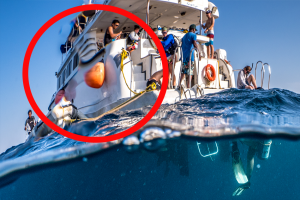
Can you tell that this part of the image has been distorted by a water droplet?

The only way to guarantee this will not happen in your image is to use a completely dry dome. If you keep the above water portion of the dome dry while shooting your split shot, this wouldn’t happen. But when does that happen!

So, unfortunately, there are no guarantees water droplets won’t make an appearance in the final image…water is unpredictable.

But there are some things we can do to minimize this risk.

Spit on your dome port

This is a famous one, because, well, you look like weirdo when you do it. But, yes, spitting on your dome port can help shed water and reduce water spots. Just like many use spit for mask anti-fog, this can work for your split shots as well.

Use an anti-fog product

Also like mask defogging, some people opt to use some sort of hair product or dedicated anti-fog product to help the dome port shed water. Shampoo or conditioner (hopefully one of many products that are not harmful to the reef), sponges, mask spray – these types of products can all be useful. Experiment with a few to see what works for you.

Dunk your camera before every shot

Dunking your camera before your split shots can be critical. It takes some time for the water to run off your port, but even after 30 seconds or so after dunking, most of the water has been shed by the dome and there are patches of dry and wet spots. These patches can cause nasty distortions in the image. If you take your shots immediately after dunking the camera, there will be fewer areas of the dome that are dry, and less distortion.

Rise and fall with the waves

Try to minimize the impact of the waves on your port. When water hits your port, it can splash up and throw droplets onto the above water area of your image. And, that impact can create messy water lines that you don’t want. Try to soften the blow by “cushioning” the waves, and physically rising and falling with them as opposed to fighting them.

Use a glass dome port

Although more expensive and heavier, glass dome ports shed water better than acrylic, and are thus better at keeping water droplets out of your images. If you can afford it, and manage the weight, these are typically better quality ports than acrylic. One trade off is, if you scratch your glass port, you’re stuck with that scratch. Acrylic ports can be buffed to remove scratches – although they are also easier to scratch.

Master Post-Production

Ok ok yes this might rile up the “I don’t use photoshop” crowd – but learning how to reduce or remove aberrations in post is an extremely valuable skill. Adobe Lightroom offers excellent clone and mask brush tools, and there are countless ways to manipulate water droplet distortion if you’re using Photoshop.

  • Author
  • Recent Posts
Morgan Bennett-Smith
Morgan Bennett-Smith is a field research scientist and photographer. He completed his B.A. in marine science at Occidental College in Southern California, and his Master’s Degree in marine science at the Red Sea Research Center in Thuwal, Saudi Arabia, where he studied coral reef symbiosis. Along the way, his photographs have won numerous international competitions and been featured by organizations such as Smithsonian, the Guardian, and Nature, and been commercially licensed over 3,000 times.
Morgan Bennett-Smith
Latest posts by Morgan Bennett-Smith (see all)
  • Choosing Your First Underwater Camera in 2026 – May 15, 2026
  • Strobes or video lights? A head-to-head comparison for the underwater photographer – October 23, 2023
  • Shooting Video AND Stills on the Same Dive [Guide] – April 6, 2023
0 people found this useful.   Me too
Not Helpful

Leave a Reply

Your email address will not be published. Required fields are marked *

Time limit is exhausted. Please reload the CAPTCHA.

Menu
  • Back to Store
  • Blog Home
  • Guides & Tutorials
  • New Housing Releases
  • Buying Guides
  • Product Reviews
  • FAQ
  • Knowledgebase
  • Underwater Photography Rig Photo Gallery
Search the Blog
Categories
Recent Posts
  • Cabo Pulmo Diving: A Beginner’s Guide
  • How to Adjust Underwater Camera Settings as Conditions Change
  • Why Your Underwater Photos Look Too Dark and How to Fix Them
  • When to Use an Underwater Strobe with Natural Light
  • How to Use Natural Light for Better Underwater Photos
Mozaik Underwater Cameras

Shipping From:
8 14th St. Blaine, WA
Canadian? Click Here

Phone: (360) 529-0990
Toll Free: 1-888-318-3550
WhatsApp: (360) 529-0990
Text: (360) 529-0990

[email protected]

Company Info
  • About us
  • Contact us
  • Return Policy
  • Warranty
  • Become an Affiliate
  • Our Ambassadors
  • Privacy Policy
  • Terms of Use
  • Sitemap
  • View All Cameras
 
Subscribe to our Mailing List
Shipping with UPS / Fedex / USPS or Canada Post
© 2006-2026 Mozaik Underwater Cameras • All Rights Reserved - 8 14th St, Blaine, WA, 98230 - All Prices are shown in USD.
Our site uses cookies to save shopping cart data, browsing history and personalize the experience with automatically triggered emails. Full Privacy Policy
Contact the seller about