
 CAD
CAD
Inon S-220 Setup Guide: Magnet Switch, Preflash, S-TTL and Manual Mode
If your Inon S-220 fires at the wrong time, gives dark images, or feels inconsistent underwater, the problem is often the preflash setup.
The most important setting is the small magnet switch on the back of the strobe, also called the Advanced Cancel Circuit switch in INON documentation. This setting tells the strobe whether your camera uses a preflash before the main flash.
Once you match the strobe setting to your camera’s flash behavior, the setup becomes much easier. This guide explains the exact rule for preflash, no preflash, S-TTL, manual mode, red-eye reduction, and the most common setup mistakes that cause confusing exposure problems underwater.
Quick Answer: How Should You Set the Inon S-220 Magnet Switch?
Use this simple rule:
- If your camera uses preflash: remove the magnet.
- If your camera flash is set to manual power with no preflash: install the magnet.
- If you are using S-TTL Auto mode: the magnet setting is less important because S-TTL handles the automatic flash control.
This same basic setup logic also applies to older compact INON strobes such as the S-2000 and D-200.
Inon S-220 Setup Cheat Sheet
| Camera Flash Behavior | Inon S-220 Magnet Setting | Best Strobe Mode | What It Means |
|---|---|---|---|
| Camera uses preflash | Magnet removed | Manual or S-TTL | The camera fires a quick measuring flash before the main flash. |
| Camera uses manual flash with no preflash | Magnet installed | Manual | The camera fires one main flash only. |
| You are using S-TTL Auto | Magnet setting is less important | S-TTL | The strobe reads the camera flash behavior and controls output automatically. |
| Red-eye reduction is on | Turn it off | Any mode | Red-eye reduction can interfere with strobe timing underwater. |
For the full technical details, you can check the official INON S-220 specifications and the official INON S-220 manual.
What the Inon S-220 Magnet Switch Actually Controls
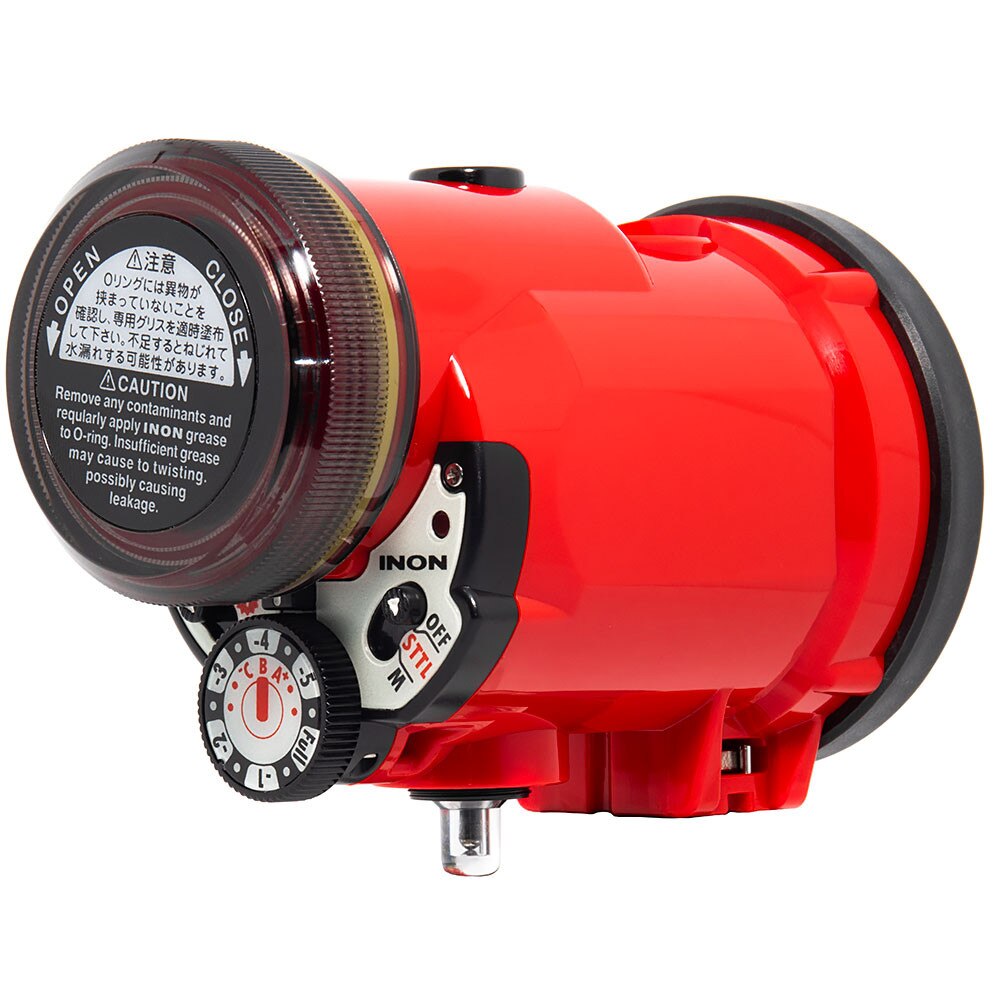
The magnet switch is the small screw and magnet that fits into the hole on the right side of the rear panel. INON refers to this system as part of the Advanced Cancel Circuit.
Its job is simple. It tells the strobe whether it should expect a preflash from your camera.
- Preflash camera: magnet removed.
- No-preflash manual flash: magnet installed.
This setting does not change the power of the strobe. It does not unlock a special shooting mode. It only helps the strobe understand how your camera flash is firing.
This matters because many compact and mirrorless camera systems trigger underwater strobes optically. The strobe sees the camera flash through a fiber optic cable or optical sensor, then fires in response. If the strobe expects the wrong flash behavior, the timing can be off. That can lead to dark frames, uneven exposure, or results that feel like a hardware problem.
In many cases, the fix is simply matching the magnet setting to the camera flash mode.
What Is Preflash and Why Does It Matter?
Preflash is a very quick, low-power flash that fires before the main flash. Your camera uses it to measure exposure and calculate how much power the final flash should use.
It happens so quickly that most people do not notice it. Underwater, your strobe does notice it, which is why the magnet setting matters.
If your camera sends a preflash and the strobe is set for no preflash, the strobe may react at the wrong moment. This can cause dark images, weak lighting, uneven exposure, or inconsistent results from one photo to the next.
When troubleshooting the Inon S-220, always start with one question:
Is my camera using preflash, or is it firing one manual flash?
Preflash and Red-Eye Reduction Are Different
Preflash and red-eye reduction are separate camera behaviors.
Red-eye reduction should be turned off when shooting underwater with the Inon S-220 or any similar optical strobe setup. Red-eye reduction can change the way your camera flash fires, which can make the strobe timing unpredictable.
Before testing your Inon S-220, go into your camera menu and turn red-eye reduction off. This is one of the easiest setup mistakes to miss.
Does the Same Rule Apply to the Inon S-220?
Yes. The Inon S-220 uses the same basic optical triggering logic as the older S-2000 and D-200 when working with S-TTL or manual optical triggering.
The simple setup rule stays the same:
- Preflash: magnet removed.
- No preflash: magnet installed.
- S-TTL Auto: the magnet setting is less important.
The main upgrades with the S-220 are performance, output, beam coverage, control design, and usability. The setup logic remains familiar for photographers who have used older compact INON strobes.

Inon S-220 Specs and What They Mean Underwater
The Inon S-220 is a compact underwater strobe designed for modern camera systems. It keeps the small travel-friendly body that made the S-2000 popular while adding more output, wider coverage, and better control.
| Feature | Inon S-220 Specification | Why It Matters Underwater |
|---|---|---|
| Guide Number | GN 22 at ISO 100/m without filter | Gives strong output for macro, close reef scenes, fish portraits, and compact wide-angle setups. |
| Beam Angle | 140° horizontal x 100° vertical without filter | Helps spread light across the frame, especially for close-focus wide-angle and reef subjects. |
| Control Modes | S-TTL Auto and Manual | Lets you choose automatic exposure control or consistent manual flash output. |
| Manual Power | 12 steps from GN 22 down to GN 3.5 | Gives fine control when balancing flash power with distance, aperture, and subject size. |
| Recycle Time | About 2.1 seconds with Eneloop batteries | Helps with faster follow-up shots when photographing active subjects. |
| Depth Rating | 100m / 328ft | Suitable for recreational and many technical diving environments. |
| Battery Type | 4x AA batteries, Eneloop recommended | Easy to travel with and simple to replace or recharge. |
| Weight | 463g with batteries | Compact and practical for travel-friendly underwater camera systems. |
The S-220 also includes the Strobe Dome Filter S [SOFT] and an ND filter for beam control. The glow-in-the-dark rear panel is helpful during night dives or low-light conditions.
You can view the Inon S-220 underwater strobe product page for more details, compatibility notes, and current availability.
Is the Inon S-220 Powerful Enough?
The answer depends on what you shoot.
For macro photography, the Inon S-220 has more than enough power. Small subjects are usually close to the lens, so you do not need a large strobe to light them well.
For close reef scenes within 1 to 2 meters, the S-220 gives strong coverage. The wide beam helps spread light across coral, fish portraits, and close-focus wide-angle scenes when the strobe is positioned well.
For larger wide-angle scenes, two strobes are usually the better setup. A single S-220 can work for some subjects, but two strobes give more even coverage and better control over shadows.
| Shooting Style | Is One Inon S-220 Enough? | Best Setup Advice |
|---|---|---|
| Macro | Yes | Use controlled strobe placement close to the subject area. |
| Fish portraits | Usually yes | Keep your strobe angled slightly outward to reduce backscatter. |
| Close reef scenes | Yes, in many cases | Use careful positioning and avoid trying to light too much water. |
| Wide-angle reef scenes | Sometimes | Two strobes usually create cleaner and more balanced lighting. |
| Large subjects | Two strobes recommended | Use wider strobe placement for more even coverage. |
For more lighting guidance, read our underwater strobe positioning guide and our ultimate underwater strobe guide.
Common Inon S-220 Setup Mistakes That Cause Dark or Inconsistent Photos
Most Inon S-220 exposure problems come from setup issues, camera flash settings, or strobe placement.
The most common mistakes include:
- Leaving red-eye reduction turned on.
- Installing the magnet while using a preflash camera in manual optical mode.
- Removing the magnet while using a camera flash set to manual power with no preflash.
- Changing camera flash settings without checking the strobe setup again.
- Expecting S-TTL to fix poor strobe positioning.
- Aiming the strobe directly through too much water, which can increase backscatter.
- Using weak or inconsistent batteries.
- Forgetting to check the fiber optic cable connection.
If your exposure looks inconsistent, start with your camera flash settings. Check whether your camera is using preflash, then make sure the magnet setting matches that behavior.
After that, check your strobe mode, fiber optic cable, batteries, and strobe position. Even when S-TTL is working properly, the strobe still needs to be aimed and placed well.
Simple Step-by-Step Inon S-220 Setup Before a Dive
- Check your camera flash mode. Find out whether your camera uses preflash or manual flash with no preflash.
- Set the magnet correctly. Remove the magnet for preflash. Install the magnet for no-preflash manual flash.
- Turn red-eye reduction off. This helps avoid unpredictable flash behavior.
- Choose S-TTL or Manual mode. S-TTL is easier for many beginners. Manual gives more consistency once you understand distance and positioning.
- Check your fiber optic cable. Make sure it is seated correctly and clean at both ends.
- Test-fire before entering the water. Take a few test shots and check whether the strobe fires at the right time.
- Adjust strobe position underwater. Move the strobe based on subject size, water clarity, and backscatter.
When Should You Use S-TTL Auto Mode?
S-TTL Auto mode is a good starting point if you are still learning underwater flash exposure. It allows the strobe to adjust output automatically based on the camera flash behavior.
S-TTL is especially useful when:
- Your subject distance changes often.
- You are photographing fish portraits or moving subjects.
- You want a simpler setup while learning strobe placement.
- You are using a compact camera system with optical triggering.
Even with S-TTL, your strobe position still matters. S-TTL can control flash power, but it cannot fix poor aiming, too much water between the strobe and subject, or heavy backscatter.
When Should You Use Manual Mode?
Manual mode gives you more consistent results once you understand your lighting distance, aperture, ISO, and strobe position.
Manual mode is helpful when:
- You want the same flash output from shot to shot.
- You are shooting macro subjects at a steady distance.
- You are balancing two strobes.
- You are working with a fixed lighting setup.
- You want more creative control over shadows and contrast.
If you shoot manual optical flash, the magnet setting becomes especially important. Match the magnet to your camera flash behavior before relying on manual strobe power.
One-Strobe vs Two-Strobe Setup With the Inon S-220
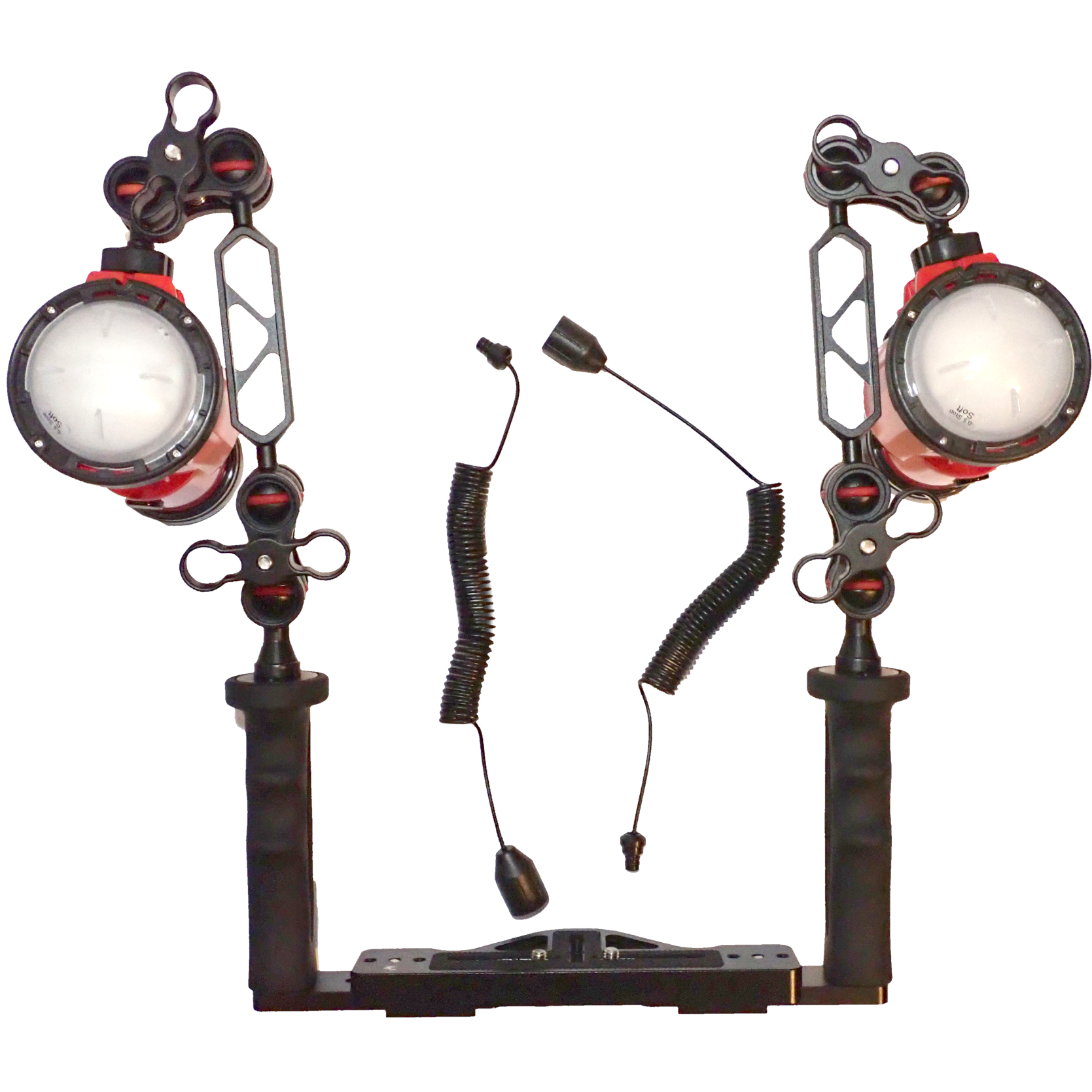
A single Inon S-220 is a strong setup for macro, fish portraits, and many compact travel systems. It keeps the camera rig lighter and easier to handle underwater.
Two Inon S-220 strobes are better for wide-angle scenes, larger reef compositions, and subjects that need more even coverage across the frame.
| Setup | Best For | Main Benefit |
|---|---|---|
| One Inon S-220 | Macro, fish portraits, small reef scenes, travel setups | Lighter, simpler, easier to control. |
| Two Inon S-220 strobes | Wide-angle, reef scenes, larger subjects, cleaner coverage | More even lighting and better shadow control. |
If you are building a complete system, you can also compare options in our guide on choosing the best underwater strobe for your camera system.
Quick Troubleshooting Guide
| Problem | Likely Cause | What to Check First |
|---|---|---|
| Photos are dark | Wrong preflash/magnet setting or strobe firing too early | Check camera flash mode and magnet setting. |
| Exposure changes from shot to shot | Mixed camera flash behavior, weak batteries, or S-TTL variation | Check flash mode, battery charge, and fiber optic cable. |
| Too much backscatter | Strobe aimed through too much water | Move strobes outward or slightly behind the housing. |
| Strobe does not fire | Fiber optic cable issue, sensor issue, or camera flash disabled | Check the cable, flash setting, and optical trigger path. |
| S-TTL feels unreliable | Subject distance, reflective background, or positioning issue | Try manual mode for a controlled test. |
FAQ: Inon S-220 Setup
Should the Inon S-220 magnet be installed or removed?
If your camera uses preflash, remove the magnet. If your camera flash is set to manual power with no preflash, install the magnet.
Does the Inon S-220 need preflash for S-TTL?
S-TTL works by reading the camera’s flash behavior. In S-TTL Auto mode, the magnet setting is less important than it is in manual optical mode.
Why are my Inon S-220 photos coming out dark?
Dark photos often come from the strobe firing at the wrong time. Check whether your camera uses preflash, then match the magnet setting to that flash behavior. Also check red-eye reduction, batteries, fiber optic cable connection, and strobe position.
Should red-eye reduction be on or off with the Inon S-220?
Red-eye reduction should be turned off. It can interfere with the way the camera flash triggers the strobe.
Is the Inon S-220 good for macro photography?
Yes. The Inon S-220 is strong for macro because macro subjects are usually close to the lens and do not require very large flash output.
Do I need one or two Inon S-220 strobes?
One S-220 works well for macro, fish portraits, and many compact setups. Two strobes are better for wide-angle scenes, larger subjects, and more even lighting.
What batteries should I use with the Inon S-220?
The S-220 uses four AA batteries. INON recommends Eneloop batteries, which also support the listed recycle-time performance.
What is the difference between S-TTL and Manual mode?
S-TTL adjusts flash output automatically. Manual mode lets you choose the strobe power yourself, which gives more consistency once you understand your lighting distance and strobe placement.
Sources and Helpful Links
- Official INON S-220 specifications
- Official INON S-220 manual
- Inon S-220 underwater strobe product page
- Ultimate guide to underwater strobe positioning
- Ultimate underwater strobe guide
- Ultimate guide to underwater macro photography

Visit his personal portfolio at www.ranmorphoto.com.
