
 CAD
CAD
Kraken Smart Housing Review: Real Dive Experience, 2026 Updates, Pros and Cons
Kraken Smart Housing Review: Real Dive Experience, 2026 Updates, Pros and Cons
The Kraken Smart Housing is built for divers who want to use their smartphone underwater with stronger protection, physical controls, vacuum sealing, and accessory support than a basic waterproof phone case.
It is especially useful for recreational divers, travel divers, snorkelers, and underwater creators who want better photos and videos without building a full compact, mirrorless, or DSLR underwater camera system.
The current product to focus on is the Kraken KRH08 V2 Universal Smartphone Housing. Mozaik lists the KRH08 V2 as in stock, with an 85m / 280ft depth rating, aluminum construction, universal smartphone support, a built-in vacuum system, and an internal 18650 battery that can charge the phone while it is inside the housing.
- Who the Kraken Smart Housing fits best
- KRH08 V2 vs KRH07 V2 Pro
- Phone fit, app control, battery workflow, and vacuum sealing
- Lighting, wet lenses, trays, and accessory planning
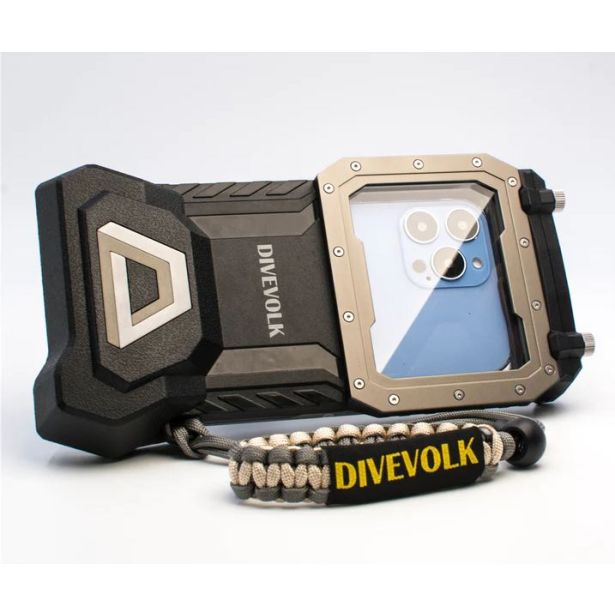
- Kraken vs GoPro and Kraken vs DiveVolk
- Suggested setup paths and common mistakes to avoid
Quick Verdict
| Question | Answer |
|---|---|
| Is the Kraken Smart Housing worth it? | Yes, for divers who want a smartphone-based underwater camera setup with stronger protection, physical controls, vacuum sealing, and accessory support. |
| Best current model to check | Kraken KRH08 V2 Universal Smartphone Housing. |
| Best upgraded model to compare | Kraken KRH07 V2 Pro with depth and temperature sensor. |
| Best for | Travel divers, recreational divers, smartphone shooters, social content, reef clips, close-up video, and casual underwater photography. |
| Main limitation | The shooting experience depends heavily on phone fit, app behavior, lighting, and accessory setup. |
| Best first upgrade | A video light, such as Kraken Hydra 3000 or Kraken Hydra 6000 v2. |
| Main buying advice | Check phone dimensions, app support, battery workflow, lens mount, and lighting needs before buying. |
Current Product Status Update
Standalone current products are the safest direction to feature in this refreshed blog. Older smartphone housing packages and discontinued bundle-style pages should be removed as active product links.
| Product mentioned in the old blog | Mozaik status / issue | Blog action |
|---|---|---|
| Kraken KRH08 V2 Universal Smartphone Housing | In stock | Keep as the main product. |
| Kraken KRH07 V2 Pro with depth and temperature sensor | In stock | Keep as upgraded comparison. |
| Kraken KRL-07 Wide Angle Lens for Smart Housing | In stock | Keep as current wet wide lens option. |
| Kraken Hydra 3000 Video/Flood Light | In stock | Keep as compact video light option. |
| Kraken Hydra 6000 v2 WRGBU Video Light | In stock | Keep as stronger video light option. |
| DiveVolk SeaTouch 4 Max | In stock | Keep as touchscreen comparison. |
| Smartphone housing package with Kraken Hydra 6000 v2 | Discontinued package signal | Remove as product link. |
| KRH08 smartphone package with Kraken Hydra 6000 v2 | Discontinued package signal | Remove as product link. |
| Kraken Macro Lens for Smart Housing +12 M67 | Discontinued status signal found | Remove as product link. |
| Hydra 6000 v2 mounted on OceanTray package | Discontinued status signal found | Remove as product link. |
| SeaLife SportDiver Ultra | No active Mozaik product page verified in this research | Remove as product link. |
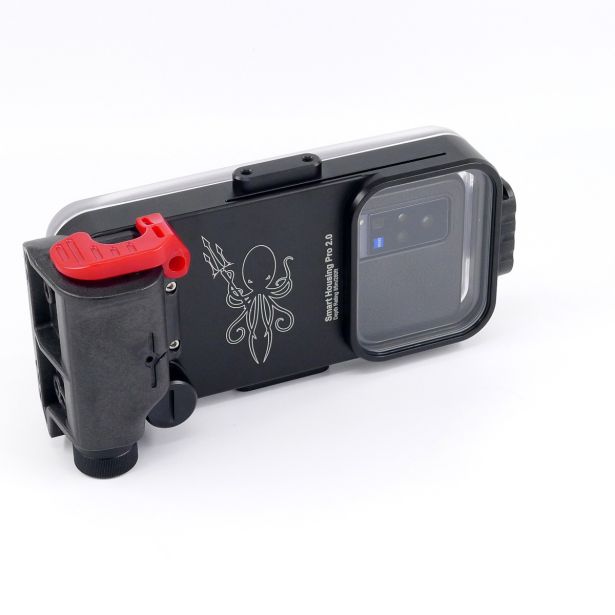
Kraken KRH08 V2 Universal Smartphone Housing
Main current Kraken smartphone housing to feature.
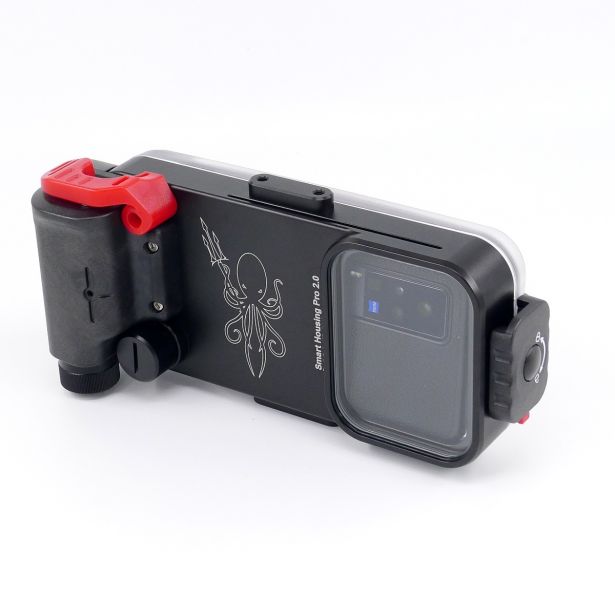
Kraken KRH07 V2 Pro Smartphone Housing
Upgraded version with depth and temperature sensor direction.
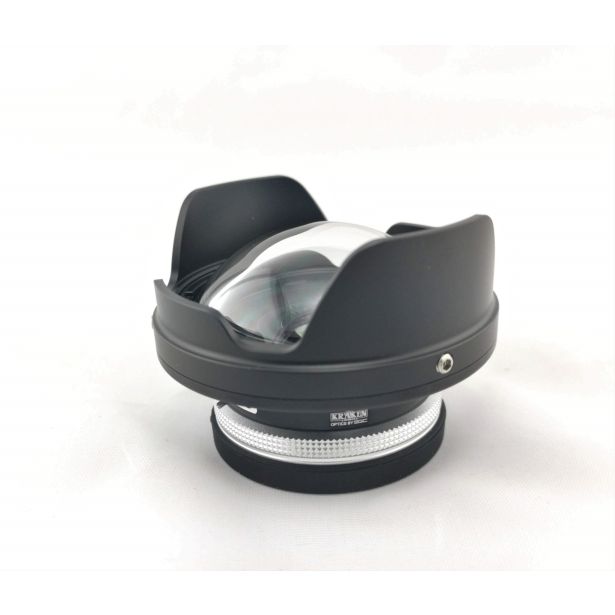
Kraken KRL-07 Wide Angle Lens for Smart Housing
Current wide-angle wet lens direction for Kraken Smart Housing setups.
Is the Kraken Smart Housing Still Current?
Yes. The Kraken Smart Housing is still current, especially in the KRH08 V2 version.
The smartphone housing category has become more serious because modern phones now offer stronger video quality, better stabilization, improved image processing, and better low-light performance. For many recreational divers, a smartphone inside a well-built underwater housing can be a practical and travel-friendly underwater camera setup.
That does not mean a smartphone housing replaces a full compact, mirrorless, or DSLR system. Dedicated underwater camera systems still give more camera control, lens options, strobe workflows, and image quality for advanced work.
Who the Kraken Smart Housing Is Best For
The Kraken Smart Housing is a good fit for divers who want to keep their setup simple while still having room to grow with lights, trays, filters, and wet lenses.
Best fit
- Divers who want to shoot underwater with their smartphone
- Travelers who want a smaller setup than a full camera rig
- Recreational divers who want better control than a waterproof phone pouch
- Beginners learning underwater photography
- Divers who want to add video lights, trays, filters, or wet lenses over time
- People who upgrade phones every few years
- Divers who prefer physical buttons underwater
- Underwater creators who want quick photo and video capture
Think carefully before buying
- You need direct touchscreen control underwater
- You need full professional camera controls
- You want a simple action-camera setup for hands-free video
- You want a system that does not rely on an app
- You need reliable strobe workflows and interchangeable camera lenses
- Your phone is very large, has a thick case, or has an unusual camera bump
A phone housing, tray, one video light, and a wide-angle wet lens can be much easier to travel with than a larger mirrorless system.
Kraken KRH08 V2 Specs at a Glance
| Feature | Kraken KRH08 V2 |
|---|---|
| Housing type | Universal smartphone underwater housing |
| Material | Aluminum |
| Depth rating | 85m / 280ft |
| Maximum phone size | 174.40mm × 81.30mm × 8.8mm |
| Exterior size | Around 9 inches × 4.5 inches |
| Weight out of water | Around 1.9 lb |
| Power | 18650 Li-ion battery |
| Phone charging | Housing battery can charge the phone inside the housing |
| Seal system | Built-in vacuum system |
| Controls | Physical buttons through the Kraken app |
| Accessory support | Wet lenses, filters, trays, mounts, and video lights depending on setup |
| Mozaik status | In stock |
Kraken KRH08 V2 vs KRH07 V2 Pro
| Model | Best for | Main difference |
|---|---|---|
| Kraken KRH08 V2 | Divers who want the standard universal smartphone housing. | Physical controls, vacuum system, 85m / 280ft depth rating, and phone charging. |
| Kraken KRH07 V2 Pro | Divers who want extra dive data features. | Adds depth and temperature sensor features. |
Why Smartphone Compatibility Matters
One of the strongest advantages of the Kraken Smart Housing is broad phone compatibility. Many smartphone housings are built around one specific phone model. That can become expensive when you upgrade your phone. A universal smartphone housing gives you more flexibility, as long as the new phone still fits inside the housing and works with the app.
Before ordering, check these details carefully:
- Phone height, width, and thickness
- Camera bump size
- Case thickness and whether the phone must be removed from the case
- Screen protector thickness
- Charging cable clearance
- Kraken app compatibility
- Whether your phone fits without pressure
Build Quality and Housing Feel
The Kraken Smart Housing feels like a real underwater housing, not a basic waterproof pouch. The aluminum body gives the housing a solid feel. The vacuum system is one of the most important parts of the design because it lets you test the seal before entering the water.
That matters because the housing is protecting an expensive phone. A vacuum system gives extra confidence, but it does not replace careful maintenance.
Before every dive, check:
- O-ring and sealing surface
- Hair, sand, salt, dust, and small particles
- Vacuum seal
- Battery level
- Lens window
- Button response
Housing Design and Controls
The back of the Kraken Smart Housing has a large viewing window, so you can see the phone screen while shooting. The housing uses physical buttons through the Kraken app. This has a clear advantage underwater because buttons are easier to use with gloves and in moving water than many touch-based systems.
The tradeoff is that the app becomes a major part of the shooting experience. If you like firm physical controls, Kraken makes sense. If touchscreen access is your top priority, compare the DiveVolk SeaTouch 4 Max.
Setup Process
| Step | What to do |
|---|---|
| 1 | Charge the phone fully. |
| 2 | Charge the housing battery. |
| 3 | Turn on Bluetooth. |
| 4 | Open the Kraken Smart Housing app. |
| 5 | Connect the phone to the housing. |
| 6 | Place the phone inside the housing. |
| 7 | Connect the charging cable if needed. |
| 8 | Close the housing carefully. |
| 9 | Use the vacuum system to test the seal. |
| 10 | Test photo, video, buttons, app, and screen view before the dive. |
Battery Life
The KRH08 V2 improves battery workflow because the housing includes an 18650 Li-ion battery that can charge the phone while it is inside the housing. This is useful because underwater smartphone shooting can drain battery quickly. The phone screen, Bluetooth connection, camera, and app may stay active during the dive.
| Battery check | Why it matters |
|---|---|
| Fully charge phone | Prevents shutdown during long dives. |
| Fully charge housing battery | Keeps internal charging available. |
| Close background apps | Reduces drain. |
| Check charging cable | Prevents failed charging inside the housing. |
| Watch phone temperature | Hot destinations can affect phone performance. |
| Test before multi-dive days | Reduces risk during travel diving. |
The App: What Still Matters
The Kraken Smart Housing depends on its app for shooting control. The housing can be strong and well-built, but the app still affects the whole experience. Before buying, check the current app performance for your exact phone.
- Recent App Store reviews
- Recent Google Play reviews
- Phone model support
- Operating system version
- RAW support
- Wide-angle camera access
- 4K support
- Video stability
- Button response
- App update history
Photo and Video Use Underwater
The Kraken Smart Housing works best as part of a complete underwater shooting setup. The housing protects the phone and gives you control, but image quality still depends on distance, lighting, stability, and lens choice.
For better underwater phone photos and videos:
- Get close to the subject.
- Move slowly.
- Use a video light when color matters.
- Use a tray and handles for stability.
- Use a wet lens only when it fits the subject.
- Clean the lens window before the dive.
- Avoid filming through too much water.
- Check the phone lens selection before entering the water.
- Lock or adjust exposure when the app allows it.
Lighting: The First Upgrade That Matters
Many smartphone users expect the phone camera to fix underwater color by itself. Underwater, light loss is physical. Water absorbs warm colors quickly. Reds, oranges, and yellows fade as you go deeper. Without artificial light, phone footage can look blue, green, flat, or low in contrast.
A video light can improve color, texture, contrast, focus accuracy, subject separation, detail in shadows, close-up video, and macro results.

Kraken Hydra 3000 Underwater Video/Flood Light
Compact first lighting upgrade for travel and close subjects.
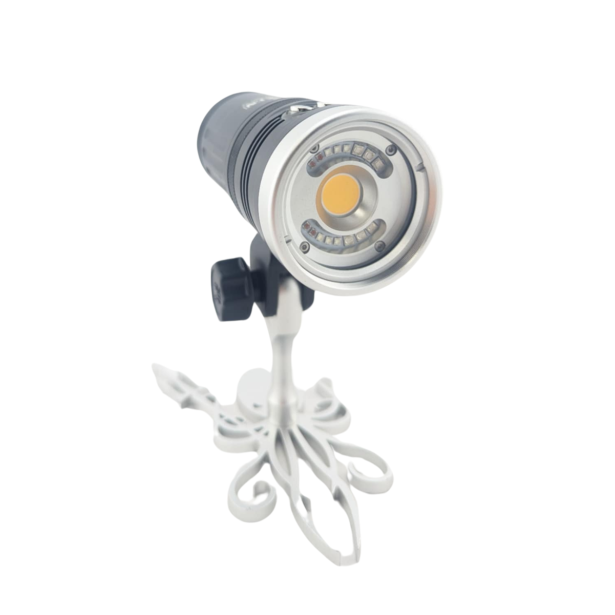
Kraken Hydra 6000 v2 WRGBU Video Light
Stronger video light option for wider reef scenes and upgraded rigs.
Current Video Light Options to Consider
| Product | Best for | Why it fits smartphone setups |
|---|---|---|
| Kraken Hydra 3000 | Compact travel setups, close subjects, casual reef video. | 3,000-lumen flood, 2,000-lumen spotlight, color modes, compact size. |
| Kraken Hydra 6000 v2 WRGBU | Stronger reef video, wider scenes, upgraded smartphone rigs. | 6,000-lumen flood, 8,000-lumen burst, RGB/UV modes, 100° underwater beam. |
| One video light | Simple travel shooting and close-range subjects. | Easier to carry and mount. |
| Two video lights | Reef scenes, wide shots, smoother coverage. | Better balance and fewer harsh shadows. |
Accessory Support: Lenses, Lights, Trays, and Filters
One reason the Kraken Smart Housing stands out is that it can grow into a more serious underwater system. You can start with the housing alone, then add accessories as your needs become clearer.
- Tray and handles
- Video lights
- Wet wide-angle lens
- Red filter
- Lens holder
- Float arms
- Lanyard
- Mounts and adapters
A tray and handles make the setup more stable. A video light restores color. A wide-angle wet lens helps with reef scenes, wrecks, divers, and large subjects.
Wet Lenses With the Kraken Smart Housing
Wet lenses can make the Kraken Smart Housing more flexible. A wide-angle wet lens helps you stay close while fitting more of the scene into the frame. That is useful for reefs, divers, wrecks, large animals, and travel footage.
| Lens direction | Best for | Current product note |
|---|---|---|
| Kraken KRL-07 Wide Angle Lens | Reefs, divers, travel footage, smartphone wide scenes. | Active Mozaik product page. |
| Macro lens for Smart Housing +12 M67 | Small subjects. | Removed because discontinued status signal was found. |
| Generic wet lenses | Setup-specific use. | Check mount, adapter, phone lens position, and storage plan. |
Kraken Smart Housing vs GoPro
| Option | Best for | Main strength | Main limitation |
|---|---|---|---|
| Kraken Smart Housing | Smartphone photos, video, travel diving, accessory-based setups. | Uses your phone camera and supports lights, trays, filters, and wet lenses. | Depends on phone fit, app performance, and button controls. |
| GoPro-style camera | Simple action video, wide scenes, compact travel filming. | Small, rugged, easy to mount. | Less flexible for controlled still-photo work and macro. |
Choose a GoPro-style system for simple hands-free video and action clips. Choose Kraken if you want to use your phone camera and build a more flexible smartphone underwater photography setup.
Kraken vs DiveVolk
| Housing | Best for | Main strength | What to check |
|---|---|---|---|
| Kraken KRH08 V2 | Divers who want physical controls, vacuum sealing, and strong depth rating. | 85m / 280ft rating, aluminum body, physical buttons, phone charging. | Phone fit, app support, cable clearance. |
| Kraken KRH07 V2 Pro | Divers who want Kraken plus depth and temperature features. | Adds sensor-focused features. | Same phone-fit and app checks. |
| DiveVolk SeaTouch 4 Max | Divers who want touchscreen control underwater. | Touchscreen-first design and access to phone functions. | Phone compatibility, glove use, accessory setup. |
Pros and Cons
| Pros | Cons |
|---|---|
| Works with many smartphones, depending on size and app support. | Shooting experience depends heavily on the Kraken app. |
| More future-friendly than phone-specific housings. | Phone fit must be checked carefully. |
| Strong build quality. | Large camera bumps or thick cases can affect fit. |
| Built-in vacuum system. | Physical buttons take practice. |
| 85m / 280ft depth rating. | Phone battery still needs planning. |
| Internal battery can charge the phone. | Requires careful O-ring and seal maintenance. |
| Supports lights, filters, trays, and wet lenses. | Professional camera systems still give more control. |
| Good option for travel divers. | Touchscreen users may prefer DiveVolk. |
| Can grow into a complete smartphone rig. | Simple action-video users may prefer GoPro. |
Real Dive Notes
The original Kraken Smart Housing experience showed three big strengths: solid build quality, strong seal confidence, and practical travel size.
The weaker points were app stability and button feel in earlier versions. The current KRH08 V2 improves the overall idea with better phone compatibility, internal charging, and a more developed smartphone housing platform. Still, the app remains important, so buyers should check recent app performance for their own phone before purchasing.
Buying Advice: What Matters Most Now
- Check exact phone fit. Do not rely on the phone name alone. Check size, camera bump, thickness, case removal, screen protector, and cable clearance.
- Check the app before buying. The app controls the shooting experience. Test it above water with your exact phone.
- Plan lighting early. A video light is one of the best first upgrades for underwater smartphone photography.
- Choose the control style you actually want. Kraken uses physical buttons. DiveVolk focuses on touchscreen access.
- Think about accessories before buying lenses. A wide-angle lens needs the right mount, adapter, lighting, and storage plan.
- Do not skip housing maintenance. A vacuum system helps, but clean O-rings and sealing surfaces still matter before every dive.
Common Mistakes to Avoid
| Mistake | Why it hurts results |
|---|---|
| Buying without checking phone dimensions. | Phone may not fit correctly. |
| Leaving the phone case on. | Housing may not close properly. |
| Ignoring the app. | App performance affects the whole experience. |
| Shooting too far away. | Water reduces color, contrast, and detail. |
| Skipping video lights. | Phone footage can look blue or flat. |
| Skipping the vacuum test. | Removes one of the housing’s main safety advantages. |
| Buying lenses without planning mounts. | Lens may not fit or store safely underwater. |
| Using the housing first on an important dive. | Setup mistakes are more likely. |
Suggested Setup Paths
Simple Travel Setup
| Part | Recommended direction |
|---|---|
| Housing | Kraken KRH08 V2 |
| Phone | Compatible iPhone or Android |
| Safety | Lanyard |
| Battery | Fully charged phone and housing battery |
| First upgrade | Kraken Hydra 3000 |
Best for: vacation divers, snorkeling, shallow reef photos, and simple video.
Better Photo and Video Setup
| Part | Recommended direction |
|---|---|
| Housing | Kraken KRH08 V2 or KRH07 V2 Pro |
| Stabilization | Tray and handles |
| Lighting | One Kraken Hydra 3000 or Hydra 6000 v2 |
| Lens | Kraken KRL-07 if wide-angle is needed |
| Upgrade | Second video light for smoother coverage |
Best for: reef scenes, fish portraits, travel video, and closer subjects.
Wide-Angle Smartphone Setup
| Part | Recommended direction |
|---|---|
| Housing | Kraken KRH08 V2 |
| Lens | Kraken KRL-07 Wide Angle Lens |
| Stabilization | Tray and handles |
| Lighting | Two video lights when possible |
| Balance | Float arms if the rig becomes heavy |
Best for: reefs, divers, wrecks, large animals, and travel scenes.
FAQ
Is the Kraken Smart Housing worth it?
Yes. It is worth considering for divers who want to use their smartphone underwater with a stronger housing, physical controls, vacuum sealing, and accessory support.
Is the Kraken KRH08 V2 the current model to check?
Yes. The KRH08 V2 is the main current Kraken universal smartphone housing to check for physical buttons, vacuum sealing, 85m / 280ft depth rating, broad phone compatibility, and phone charging inside the housing.
Does the Kraken Smart Housing work with iPhone and Android?
Yes, it is designed for many iPhone and Android phones. You still need to check exact phone dimensions and app compatibility before buying.
How deep can the Kraken KRH08 V2 go?
Mozaik lists the KRH08 V2 with an 85m / 280ft depth rating.
Can the Kraken Smart Housing charge your phone?
Yes. The KRH08 V2 uses an 18650 Li-ion battery that can charge the phone while it is inside the housing.
Can you use wide-angle lenses with it?
Yes. The Kraken KRL-07 Wide Angle Lens is designed for Kraken Smart Housing and is listed as in stock on Mozaik.
Is Kraken better than a GoPro underwater?
Kraken is better when you want to use your smartphone camera and build a tray, light, and wet-lens setup. A GoPro-style camera is easier for simple action video and compact mounting.
Is Kraken better than DiveVolk?
Kraken is better for physical buttons, vacuum sealing, stronger depth rating, and accessory-based setups. DiveVolk is better for divers who want touchscreen control underwater.
What should I check before diving with the housing?
Check the O-ring, sealing surface, battery, app connection, buttons, phone fit, vacuum seal, lens window, charging cable, and accessories. Take a test photo and test video before entering the water.
Final Thoughts
The Kraken Smart Housing remains a strong option for divers who want to use their smartphone underwater in a safer and more capable way.
Its biggest strengths are broad phone compatibility, solid aluminum construction, vacuum sealing, physical controls, accessory support, and the ability to grow into a complete smartphone underwater photography setup.
The current KRH08 V2 is the main model to feature. It is listed as in stock on Mozaik and includes an 85m / 280ft depth rating, vacuum system, and internal 18650 battery that can charge the phone inside the housing. The KRH07 V2 Pro is worth comparing for divers who want the added depth and temperature sensor direction.
For better underwater results, pair the housing with good lighting first. A Kraken Hydra 3000 is a practical compact starting point, while the Hydra 6000 v2 gives stronger output for more serious video setups. For wide-angle smartphone shooting, the Kraken KRL-07 is the current wet lens to feature from Mozaik.
The main thing to remember is that the housing is only one part of the system. Phone fit, app performance, lighting, distance, lens choice, and stable handling all affect the final image.
For recreational divers, travel divers, and smartphone shooters who want a flexible underwater setup without building a full camera rig, the Kraken Smart Housing is a serious and practical option.
Need Help Building the Right Smartphone Setup?
Send Mozaik your phone model, dive style, and the type of subjects you want to shoot. The team can help match the right housing, video light, wet lens, tray, and accessories to your underwater goals.
Product Links Used in This Blog

Visit his personal portfolio at www.ranmorphoto.com.
